Can an app connected to YNAB change my budget?
Not with read-only access. YNAB refuses every write from a read-only token, so Whatif cannot change a budget, a transaction, a category or a target.
By Fareed ·
An app connected to your YNAB budget can change it only if YNAB granted it access that permits writing. With read-only access it cannot, whatever the app is built to do: the refusal happens at YNAB, on every request that would change anything, and nothing in the budget moves. So the question to ask of a connected app is not what it promises to leave alone, but what access it holds.
YNAB’s API lets an app ask for read-only access when you connect it. A token granted that way can read a budget and nothing else: YNAB refuses any request made with it that would change data. That makes read-only a property of the credential, held at YNAB, rather than a policy the app chooses to follow. A promise in an app’s terms is the app’s to keep; a read-only scope is YNAB’s to enforce.
What Whatif asks for, and what it does with the answer
Whatif connects to YNAB with read-only access. It cannot change a budget, a transaction, a category or a target — not by design choice, but because the access it is granted does not permit it.
Three things in the code keep that true, each of a different kind:
- There is one scope, and it is not a setting. The connect flow asks YNAB for read-only access, and nothing in the codebase can ask for more. A configuration value is one deploy away from being wrong, so there is no configuration value.
- The scope YNAB grants is checked, not assumed. When YNAB hands back a token, Whatif reads the scope on it. A token that does not say read-only is refused and never stored, because a credential with more access than the promise allows is not one Whatif keeps.
- Every request to YNAB is a read. The code that talks to YNAB has one way of making a request, and it reads. There is no request in it that sends anything to your budget.
What it reads
From the budget you choose, Whatif reads your accounts and their balances, your categories and their targets, your scheduled transactions and your payees. That is what the forecast is built from, and how Whatif forecasts a YNAB budget explains what it does with each of them.
Individual transactions arrive in the same response. Whatif keeps them only if you turn on the screen that adds up how past months actually went, and deletes them when you turn it off or disconnect.
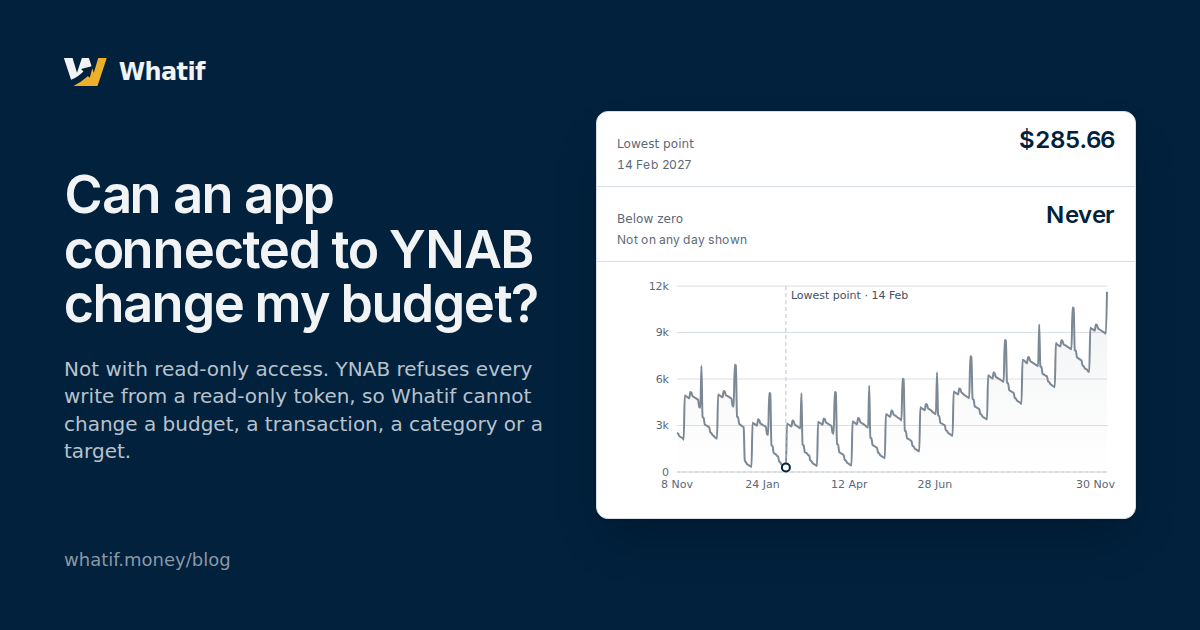
Here is what that reading produces, on Whatif’s sample budget: the Austin household’s cash a day at a time for twelve months, worked out from its balances, its schedules and its targets as they stand on 8 November 2026, with the lowest point marked.
- Lowest point
- $285.66
- 14 Feb 2027
- Below zero
- Never
- Not on any day shown
Every input to that line is something read from a budget, or a figure the reader of that budget stated in Whatif.
Where your changes go instead
Whatif is a place to change things, and none of those changes reach YNAB.
- Your corrections live in Whatif’s plan. When a target is out of date and you state the real figure, the figure is stored in Whatif, and the forecast uses yours from then on. The category in YNAB keeps its target. A row follows YNAB’s target until you state a figure of your own.
- A scenario is a change laid over the forecast. Cutting a category, adding a one-off or moving your income draws a second line against the forecast. Saving a scenario saves it in Whatif.
- The assistant reads. Every figure it gives comes from a tool that runs the forecast or reads the spending screen’s own totals, and none of its tools writes.
- A sync runs one way. It reads YNAB and updates Whatif’s copy: it fills in what is missing, follows a target that changed under a row that follows it, and writes each change it makes to the plan on Notifications. A row whose figure you stated keeps your figure.
What read-only does not cover
Read-only is about writing to YNAB. It says nothing about what Whatif keeps on its side, so that has its own answer: what was read from a budget is stored to build the forecast, kept fresh by a sync every hour, and removed from Whatif along with your plan and scenarios when you disconnect that budget.
YNAB’s access tokens last two hours, and Whatif renews them in the background so a sync can run without you. YNAB can also revoke an app’s access to its API at its own discretion. If it did, Whatif would stop reading; it still could not write.
Seeing it on your own budget
Whatif reads your YNAB budget and forecasts it a day at a time, with the lowest point and the day it falls on. A sample budget shows the whole product with no account needed — nothing you change here is saved. To see the forecast for your own budget, connect it; the fourteen-day trial needs no card. The connection asks YNAB for read-only access, and Whatif refuses a token that does not have it.