If I change a YNAB target, does my forecast change?
Yes, at the next sync, for every row still on YNAB's target. A figure you stated in Whatif stays yours, and each change a sync makes goes on Notifications.
By Fareed ·
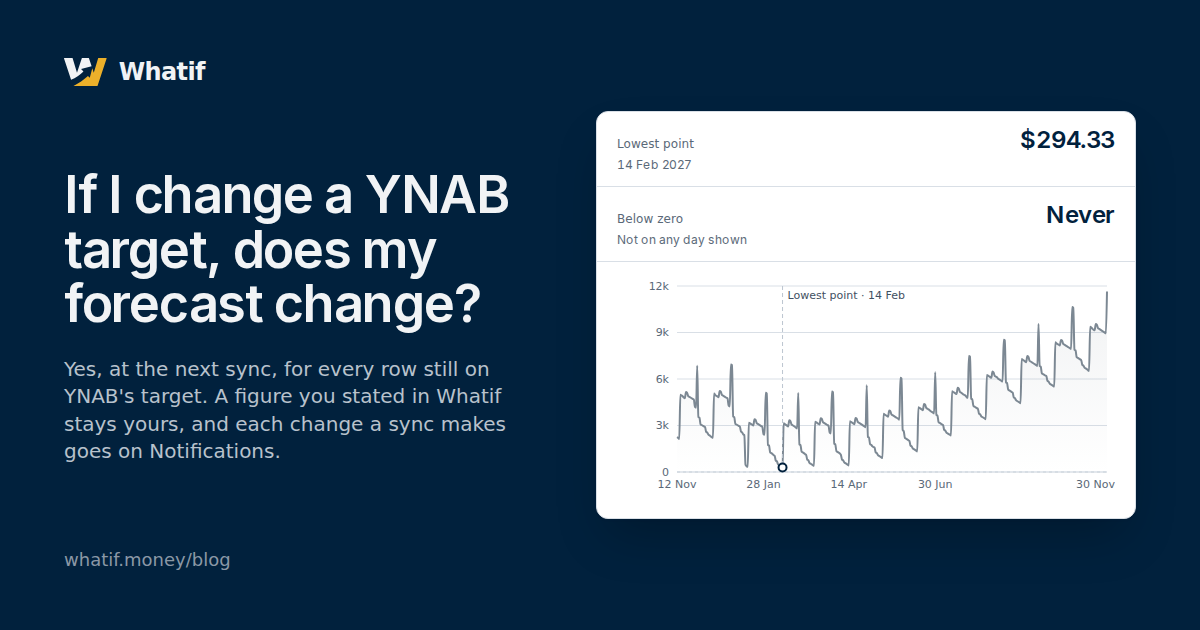
If the forecast’s figure for a category is still YNAB’s target, it changes when the target does: edit the target in YNAB, and the next sync moves the forecast with it. If you have stated a figure of your own for that category, it does not: your figure stays, and the forecast goes on using it. Either way the sync writes down what it did, so a forecast that moved can be traced to the target that moved it.
YNAB keeps a target on each category and tells you what it asks you to assign this month. It budgets the money you have today; it does not walk your accounts forward a day at a time, so a target changed in YNAB says nothing about how low your cash gets in March. A forecast built from those targets has to say which figure counts when one moves. How Whatif forecasts a YNAB budget covers the rest of what goes into it.
Where the forecast’s spending comes from
When a budget is first read, each category with a target becomes a spending row in Whatif’s plan, at the target’s figure and on its rhythm. A category paid by a scheduled transaction becomes a row at the schedule’s figure and on its date. That plan is what the forecast walks forward.
This is the forecast for Whatif’s sample budget, the Austin household, worked out from its balances, its scheduled transactions and its targets as they stand on 12 November 2026, with the lowest point marked.
- Lowest point
- $294.33
- 14 Feb 2027
- Below zero
- Never
- Not on any day shown
In a connected budget, each row that came from a target follows it: change the target in YNAB, and the next sync redraws the line from the new figure.
A row follows YNAB until you state a figure
Each spending row is in one of two states, and the plan knows which.
- A row nobody has touched follows YNAB. It holds the target’s figure, and after every sync it is brought into step with what YNAB says now: a new amount, and a new rhythm if the target’s changed too. A row with no figure that gains a target in YNAB is filled from it and counted from then on.
- A row with a figure you stated is yours. Stating an amount anywhere makes it so — typing one in, adopting the average of past months offered beside the row, setting a payment on a debt’s card. From then on no sync changes the figure, whatever YNAB’s target does.
- The way back is one click. When YNAB’s target differs from your figure, it sits beside the row, labelled YNAB target. Taking it puts the row back on YNAB’s target, and it follows from then on.
Some things change the forecast without changing whose figure a row holds. A snoozed row is out of the forecast until the month you pick, and a row that followed YNAB before the snooze goes on following it. A scenario is a change laid over the forecast, not an edit to the plan, so it changes no row’s figure and no row’s state. A row made from a scheduled transaction carries the schedule’s figure and date rather than a target’s, and a change to the target does not move it.
None of this reaches YNAB. Whatif connects to YNAB with read-only access, and what read-only access means explains why the target in YNAB is never touched, whichever figure the forecast uses.
When YNAB withdraws a target
Removing a target, or deleting or hiding its category, is followed the same way.
- A row that follows YNAB follows it out of the forecast. Its figure goes to nothing and the row stops counting, the state a category with no target is read in. If a target is set again later, the row is filled from it again.
- A row with your figure keeps counting. The sync leaves it as it is and says what YNAB did under it.
What Notifications records
Every change a sync makes to the plan is written down when it happens and listed on Notifications, so none of it is silent. A notification is a record: it stores the row’s name and its figures as they were at that sync, and it is never rewritten.
| What YNAB did | A row that follows YNAB | A row with your figure |
|---|---|---|
| Changed the target | Takes the new figure; the notification gives the old one | Keeps your figure; the notification gives YNAB’s new one |
| Removed the target | Leaves the forecast; the notification gives what it was | Still counted; the notification says the target is gone |
| Deleted or hid the category | Leaves the forecast; the notification gives what it was | Still counted; the notification says the category was deleted or hidden |
| Created a category with a target | Arrives as a new row, in the forecast | — |
One sync says nothing: a budget’s first read. Every row is new then and nothing has changed, so the plan is read in setup instead of as a notification per category. New notifications are listed first, and the navigation counts the ones nobody has read.
Seeing it on your own budget
Whatif reads your YNAB budget and forecasts it a day at a time, with the lowest point and the day it falls on. On the Spending screen, a row whose figure is yours shows YNAB’s target beside it wherever the two differ, as the one click that follows it again. A sample budget shows the whole product with no account needed — nothing you change here is saved. To see which of your own rows follow YNAB, connect your YNAB budget; the fourteen-day trial needs no card.